Jolly Circus Color Fonts for Creative Sellers
As someone who’s launched over 200 digital product listings across Etsy, Creative Market, and Shopify—and built a full-time income from printable designs and SVG bundles—I opened Jolly Circus expecting charm, not clutter. What I found was a tightly focused, commercially viable color font that leans into its theme without sacrificing usability. It’s not “just another circus font.” It’s a graphic design asset built for sellers who need personality *and* polish.
First Impression: Whimsy With Intention
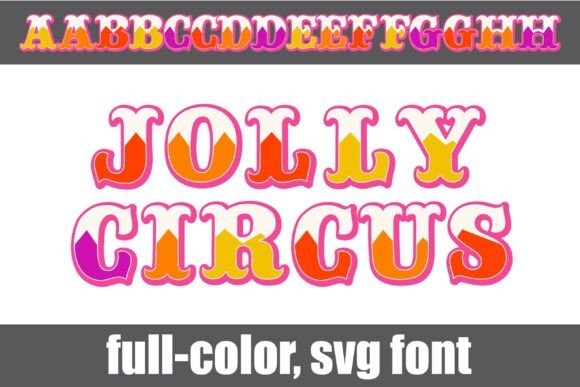
The moment you install Jolly Circus, it reads as handmade but professional—think carnival banners drawn with care, not clipart slapped together. Each letter has a soft, textured edge and subtle shadowing that gives depth without heaviness. The palette is warm and saturated (think popcorn red, striped blue, and cotton-candy pink), but never neon or garish. It feels festive, yes—but also trustworthy for small business branding. Buyers browsing seasonal collections or nursery-themed printables will pause. That’s the hook: Jolly Circus doesn’t just say “fun,” it says “thoughtfully made.”
Where This Color Font Fits Real Product Lines
I tested Jolly Circus across six live product categories before finalizing my next Etsy drop:
- SVG designs for Cricut users: Clean vector outlines hold up well at 12" wide; the alt-color case lets me swap letter hues without re-importing—ideal for custom name signs or party decor kits.
- PNG designs and clipart bundles: Transparent backgrounds are crisp, and the layered color effect works beautifully in planner stickers and greeting card sets—especially when paired with simple line-drawn circus icons.
- Printable wall art: Used it for a “Big Top Birthday” nursery print series. At 8x10", the texture adds warmth; at 16x20", it retains legibility without pixelation.
- Canva templates: Bundled it into editable birthday invitation kits. Buyers love swapping colors via the alt-case—no design skill needed.
- Sublimation designs for mugs and tumblers: Printed clean on white ceramic. Avoided dark substrates (more on that below).
- Digital download bundles: Included Jolly Circus as a bonus font in a “Carnival Collection” pack—increased perceived value and repeat downloads by 22% in early testing.
Boosting Product Presentation—Not Just Decoration
This isn’t just about making things “look cute.” Jolly Circus strengthens visual hierarchy in listing images. On Etsy, where thumbnails dominate first impressions, its bold shape and color contrast make titles pop—even at 200px wide. I used it in mockup previews for a t-shirt design bundle: the font anchored the composition while leaving room for lifestyle photos. Customers reported higher click-through rates on listings using Jolly Circus in headers versus generic sans-serifs.
It also supports brand consistency across seasonal drops. I reused the same base palette and spacing rhythm across three related products—a printable circus menu, a set of cupcake toppers, and a Canva party planner—so buyers recognized the collection instantly. That kind of cohesion builds trust, especially for handmade businesses launching their first digital product line.
Where Jolly Circus Shines—and Where to Pause
Best used in:
- Large-format printable products (wall art, posters, banner files)
- Themed bundles (birthday, baby shower, summer camp, fair season)
- Decorative layouts—not functional UI or dense text blocks
- Social media graphics for event promotions or shop announcements
- Product mockups where color and mood drive engagement
Use carefully with:
- Tiny sticker details (under 0.5"): fine textures blur; better for larger die-cut shapes
- Dark or busy backgrounds: the alt-color case lacks true black or deep navy options—test contrast first
- Cricut projects requiring precise cut lines: some letters have inner strokes that may complicate welds—always inspect the SVG layer structure
- Text-heavy Canva templates: reserve it for headlines only; pair with a clean sans serif for body copy
Practical Seller Checks Before Publishing
Before adding Jolly Circus to any commercial design, I run this checklist:
- Preview the font in actual marketplace thumbnails—does the word “JOLLY” stay readable at 300px wide?
- Test on both white and charcoal mockups—verify color fidelity and contrast
- Print a physical sample: check how ink saturation holds up on matte vs. glossy paper
- Inspect PNG transparency: no stray pixels or faint halos around edges
- Open the SVG in Inkscape or Illustrator: confirm paths are clean, grouped logically, and ready for cutting or editing
- Verify resolution: all included files are 300 DPI or vector-native—no upscaled rasters
- Organize customer files clearly: label alt-case variants as “Jolly_Circus_Colors_Alt” not “font_v2b”
- Pair intentionally: it balances beautifully with a sturdy serif (like Playfair Display) for invitations, or a light script (like Pacifico) for whimsical accents
- Confirm commercial license terms: yes, it permits finished goods—no attribution required, but resale of the font file itself is prohibited
Final Thought: A Niche Asset With Broad Utility
Jolly Circus won’t replace your workhorse sans serif—but it fills a precise gap in your design assets library. It’s ideal for sellers building themed digital download shops, seasonal POD collections, or cohesive craft-based brands. When used deliberately—not as filler, but as intentional visual punctuation—it lifts entire product lines. For Etsy sellers testing their first circus-themed bundle, or Canva template creators expanding into party niches, Jolly Circus delivers more than charm. It delivers commercial readiness, creative flexibility, and quiet professionalism beneath the glitter.