Christmas Calories: A Festive Color Fonts Collection
First Impressions—Whimsy That Sells
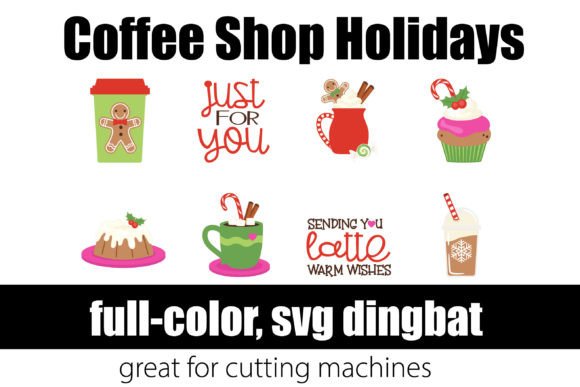
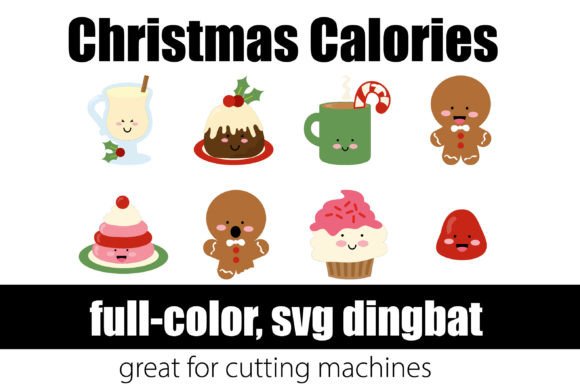
When I opened Christmas Calories for the first time, I immediately pictured my holiday mug collection—those cozy ceramic mugs with cinnamon swirls and peppermint sticks that fly off my Etsy shop every December. This isn’t just another festive font—it’s a full-color dingbat font built around Christmas treats: candy canes, gingerbread men, frosted cookies, hot cocoa mugs, and tiny wrapped presents. It lands somewhere between playful and polished—whimsical but not childish, decorative but still legible as a design element. My ideal customer? The thoughtful gift-giver who shops handmade for joyful, personality-packed items—not mass-produced cheer, but curated warmth. It leans feminine and cozy without being cutesy, and it reads as premium when paired with clean layouts or natural-material packaging.
Real Crafting Workflow: Where Christmas Calories Shines
I tested Christmas Calories across six real product types in my studio: vinyl-cut mugs, printable gift tags, Cricut-made sticker sheets, sublimation tumbler wraps, digital planner sticker packs, and seasonal tote bag designs. As a Color Fonts asset, it installs like any .otf—but unlike standard fonts, each glyph renders in full color, no layering required. That means one click in Cricut Design Space or Silhouette Studio gives me a ready-to-cut candy cane or snow-dusted cupcake, complete with shading and highlights.
- Cricut & Silhouette projects: Works flawlessly as an OpenType SVG font—no manual tracing needed. I used it for layered vinyl mug decals (white base + red/green candy cane), and the color separation held up perfectly at 3" width.
- Sticker design & printable products: Exported clean PNGs with transparency for my Etsy sticker bundle—no jagged edges, even at 300 DPI. Perfect for planner pages and gift tag sets.
- Mug design & tumbler wraps: Scaled smoothly to 4.5" for sublimation. Colors stayed vibrant on white and light-gray tumblers; I adjusted brightness slightly for dark substrates using my RIP software.
- Handmade packaging & branding: Used the gingerbread man glyph as a subtle watermark on thank-you cards and tissue paper—it added instant seasonal charm without overwhelming the brand voice.
Where It Fits Best—And Where to Pause
Christmas Calories excels in high-visibility, joyful contexts: large cut files for craft fair banners, clean printable layouts for digital downloads, seasonal craft bundles (think “Holiday Sticker Kit” or “Merry & Bright Planner Pack”), and gift products where visual delight drives purchase decisions. It’s especially strong in decorative accents—like framing a custom quote on a printable wall art piece—or personalizing items (“Emma’s Hot Cocoa Bar” with floating marshmallows).
That said, I recommend caution in these scenarios:
- Very small cutting details—below 0.75" height, some fine lines (like cookie icing swirls) risk losing definition on vinyl or heat-transfer material.
- Crowded compositions—when placed alongside dense script fonts or busy clipart, the glyphs can compete rather than complement.
- Layered vinyl projects requiring precise alignment—while the SVG is clean, overlapping colored elements may need manual path cleanup if you’re stacking vinyl colors.
- Small sticker sizes (<0.5")—the full-color detail softens; better to simplify or use single-line versions if available.
Practical Crafter Notes You’ll Actually Use
Before listing anything on Etsy or packing customer orders, here’s what I did—and what I recommend you do too:
- Test before selling: Cut one mug decal, print one gift tag set, and sublimate one tumbler wrap using your exact workflow—don’t assume compatibility.
- Check SVG line integrity: Zoom into paths in Silhouette Studio or Illustrator—look for stray nodes or open contours that could cause cutting errors.
- Preview PNG transparency: Drop exported PNGs over black and white backgrounds to verify crisp edges and true alpha channels.
- Confirm resolution for sublimation: At 300 DPI and scaled to final size, Christmas Calories holds up beautifully—but always soft-proof on your printer’s test sheet first.
- Test colors on real products: What looks rich on screen may mute on kraft paper or dark apparel. I printed swatches on my Epson SureColor and compared side-by-side.
- Place on mockups: I dropped glyphs into Canva mockups for mugs, stickers, and totes—seeing them in context revealed spacing issues I’d missed on the artboard.
- Resize thoughtfully: It scales well up to 8", but avoid stretching beyond native proportions—some glyphs distort if forced into extreme aspect ratios.
- Pair intentionally: I paired it with a warm serif (Cormorant Garamond) for greeting cards and a friendly sans (Quicksand) for digital products. Avoid competing scripts—let Christmas Calories be the festive star.
- Verify commercial license: Yes, this graphic design asset includes full commercial rights—but double-check the license file for restrictions on print-on-demand platforms or resale as standalone clipart.
Why This Matters for Your Handmade Business
As a maker who ships 200+ holiday orders yearly, I don’t stock assets just because they’re pretty—I stock ones that convert. Christmas Calories does that. It adds instant seasonal credibility to digital products, speeds up physical production (no more hand-drawing 20 candy canes), and helps my brand feel cohesive across stickers, mugs, and packaging. It’s not a “set and forget” font—it’s a versatile, reliable design asset that supports real business goals: faster turnaround, higher perceived value, and repeat customers who recognize my joyful, treat-inspired aesthetic. Whether you’re prepping for a craft fair, launching an Etsy holiday collection, or designing your first printable planner pack, Christmas Calories earns its spot in your creative marketplace toolkit—not as decoration, but as functional, sale-ready design fuel.