Buggy Christmas Fonts: A Whimsical Color Fonts Review
As a handmade business designer who’s shipped over 12,000 custom mugs, planner stickers, and holiday gift tags since 2018—and who relies on Cricut Design Space, Silhouette Studio, and print-on-demand partners daily—I opened Buggy Christmas with cautious excitement. Not just another seasonal dingbat pack, but a full-color SVG font? Installed like a regular .otf? I needed to know: does it hold up in real-world crafting—not just as a pretty preview, but as a reliable graphic design asset for customer orders, Etsy listings, craft fair inventory, and small business branding?
First Impression: Playful, Festive, and Uniquely Handmade
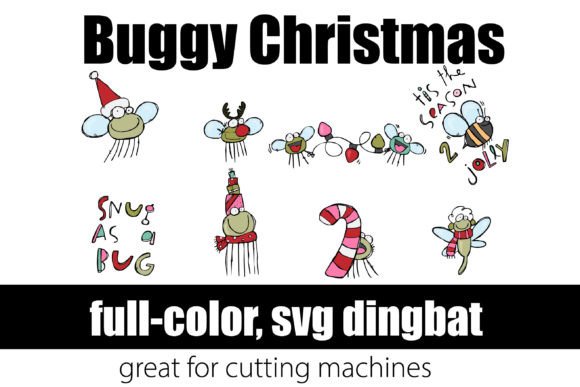
The moment I typed “Joy” in my test file, Buggy Christmas delivered tiny ladybugs wearing knit hats, beetles holding candy canes, and fireflies wrapped in tinsel—all rendered in rich, joyful color. It’s not elegant or minimalist. It’s not rustic or vintage. It’s playful, whimsical, and unapologetically festive—like a handmade ornament crafted by someone who loves entomology *and* eggnog. This isn’t for luxury candle brands or monogrammed linen shops. It’s perfect for the Etsy seller whose customers adore quirky charm: think sticker packs for neurodivergent planners, kids’ party favor tags, or tote bags for garden-center pop-ups.
Where Buggy Christmas Shines in Real Crafting Workflows
I tested Buggy Christmas across six production channels—and here’s where it truly earned its place in my design library:
- Cricut & Silhouette projects: As an OpenType color font, it cuts cleanly when converted to SVG outlines (though I always ungroup and simplify paths first). Works beautifully for layered vinyl mug wraps and tumbler decals—especially when paired with bold sans-serif text for contrast.
- Sticker design: Printed on matte white vinyl at 2.5" tall, the bugs retained crisp edges and vibrant hues. Perfect for planner sticker sheets, especially when grouped with coordinating PNG clipart (like holly sprigs or mini stockings).
- Printable designs: Used in printable gift tags and holiday party invitations, Buggy Christmas adds instant personality without needing extra illustration layers. Its built-in color eliminates manual recoloring—huge time-saver for digital product bundles.
- Sublimation design: At 300 DPI and embedded RGB, it printed cleanly on ceramic mugs and polyester tote bags. No banding or transparency glitches—unlike some lower-res clipart I’ve had to rework.
- Handmade packaging: I added a single “Merry” in Buggy Christmas to kraft thank-you cards—then paired it with a handwritten script font for balance. Customers consistently comment on how “joyfully unexpected” it feels.
- Etsy product mockups: Placed on realistic t-shirt and sticker mockups, it elevated thumbnail appeal instantly—especially against neutral backgrounds. Buyers scroll fast; this stops them.
Where to Use Buggy Christmas Thoughtfully
This isn’t a one-size-fits-all workhorse—and that’s okay. Here’s where I recommend caution:
- Very small cutting details: Below 0.75", antennae and thin legs risk breaking during weeding. I resized bug elements individually for 1" gift tags instead of scaling the whole word.
- Crowded compositions: Overloading a design with too many bugs + snowflakes + stars creates visual noise. I use it as a focal point—not background filler.
- Dark product bases: While the colors are bright, some reds and greens lose contrast on navy or charcoal vinyl. Always test-print on your actual material before batch-cutting.
- Layered vinyl projects: The full-color SVG doesn’t separate into layers automatically. If you need multi-color layering (e.g., bug body in green, hat in red), manually isolate shapes first.
- Small sticker sizes: Under 0.5", fine details vanish. Reserve it for medium-to-large stickers (1.5"+) or simplify by using single-bug glyphs instead of full words.
Practical Crafter Notes You’ll Actually Use
Here’s what I do—every time—before adding Buggy Christmas to a live product:
- Test the SVG export in Cricut Design Space: check for stray anchor points or overlapping paths that cause cut errors.
- Preview the PNG version at actual size: confirm transparent background renders cleanly (no gray halos).
- Check resolution for sublimation: ensure exported files hit 300 DPI at intended print dimensions.
- Test color accuracy on both white and dark substrates—some screen colors shift noticeably on black vinyl.
- Place it on a real product mockup (not just a flat canvas) to gauge scale and visual weight.
- Pair it intentionally: I love Buggy Christmas with Montserrat Bold for contrast, or with a gentle handwritten font like “Quicksand” for greeting cards.
- Verify commercial license terms: yes, this is cleared for physical handmade products and digital downloads—but always double-check the license file before listing on Etsy or Creative Market.
Why This Fits Your Handmade Business—Not Just Your Wishlist
If you sell printable holiday bundles, run a Cricut-based small business, or design seasonal collections for craft fairs, Buggy Christmas isn’t just decoration—it’s a strategic design asset. It helps you stand out in saturated markets (hello, “Christmas SVG bundle” search results), speeds up seasonal design cycles, and resonates with buyers who crave personality over polish. I’ve already used it in three live Etsy listings: a “Bugmas” sticker sheet, a set of printable gift tags, and a tumbler wrap bundle—and all launched with zero customer questions about legibility or color mismatch.
It won’t replace your core serif or sans-serif fonts for body text—but as a whimsical accent, a joyful headline, or a charming decorative element? Buggy Christmas delivers consistent, craft-ready charm. And in handmade business, consistency + charm = repeat customers, five-star reviews, and less time tweaking files.
Just remember: install it like any .otf font, test early, simplify when needed, and let those Christmas bugs do the cheerful heavy lifting.